
Experience Trusted, Remote Access For Your USB Devices With The Security And Reliability of USBoNET.
No Limits, Just Possibilities!
Share USB Over Ethernet
USBoNET Empowers Your USB Devices For Remote Collaboration by Helping To Share USB Over Ethernet Effortlessly and Securely.


Trial version limatations
Trial period: 15 days (it starts as soon as you launch the application).To get 1 year free, you need to click register in the application and request a free key for 1 year.
Maximum 3 USB device can be connected. Gate mode – Enabled. WebAdmin Service – Available.
Do you find yourself:
USBoNET can efficiently resolve all these and many more concerns others related to shared remote control of any USB devices.
Choose USBoNET: Your Remote USB Partner.
Local or Global, Your USB Devices Are Just a Click Away.
USBoNET Connects Your USB over Ethernet, over any Network Seamlessly.
Runs on OS: Windows 10/11; Windows Server 2019/2022.
Architectures: x86, x64, ARM64.
MacOS, Linux, Android, Windows 7 SP1/8/8.1 and Windows Server 2008 R2/2012/2012 R2/2016: Coming soon, stay tuned.
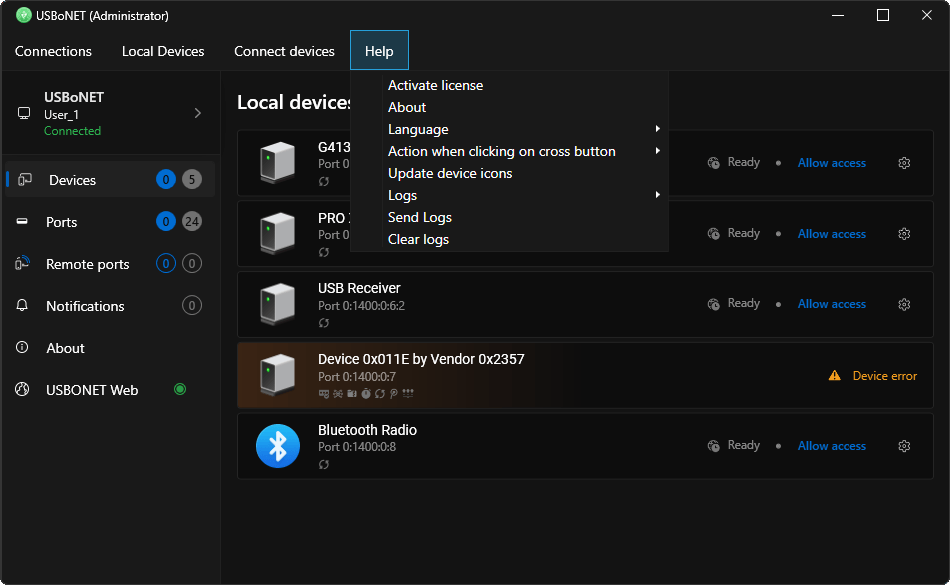
USBoNET is Your Choice of USB Over IP Software
With USBoNET You can now easily direct ANY USB device over Ethernet, making it appear on the remote PC as if it were physically linked to that computer.
With our solution, that you can trust, you can remotely control USB devices over any network, whether it’s the Internet, LAN, WAN, WI-FI, RDP, VPN, 5G, LTE ensuring secure and private access to your USB Dongle, HID Devices, Peripherals, Communication Devices, Computer Equipment, Data Input/Output Devices, Microcontrollers, Biometric and Fingerprint scanners, Medical and Healthcare devices, Music industry equipment, or any other devices, from anywhere in the world.
Use your chance to download this USB over Network software for free (a trial version). It’s an efficient solution for those seeking to share USB devices seamlessly over the internet protocol.
Explore USBoNET by HighFigure Advantages
Over competitors and their Benefits for You
Here you will find standout features that sets USBoNET apart from competitors.
Superior Compatibility with Any Network Environment (Complex Corporate or Home):

1.USBoNET’s feature called Gate Mode provides a straightforward solution for locating shared USB devices on computers outside your local network, enabling USB devices to connect with just a single click and no extra configurations! This mode simplifies how to share and access USB devices across different networks. With Gate Mode, the complexity of remote USB device connectivity is a thing of the past for you.
2. Unlike some competing software products that use various random ports, our USB over Ethernet solution uses a single port for network communication between devices. This method simplifies the process of sharing USB devices over the network and ensures a more stable connection.
3. Unlike some competitors, the connection is established to the USB port, and not to the device. In case of reboot or temporary shutdown of the device (for example, during the iPhone firmware update), another computer will not connect to this device under any circumstances! Because the first computer does not close the network connection when the physical USB device is temporarily lost. This approach makes it impossible to damage the device.

4. Unprecedented Data Protection and Secure Connection. The modern Elliptic Curve Cryptography is used to guarantee customer data privacy. Strong encryption makes it extremely challenging for potential attackers to break the encryption, ensuring a high level of security for encrypted data.

5. Enhanced Efficiency and Responsiveness. The software uses a notification-driven method for communication between its components (driver, GUI, service) and computers. This approach is more resource-efficient, especially in terms of CPU and network usage, compared to the periodic polling method used by alternative USB sharing solutions over the network. Such a design significantly improves the system’s overall efficiency and responsiveness.
WEBAdmin (remote USB instant access anywhere, anytime): This feature lets you share, connect, disconnect, and control all your USB devices remotely, using nothing but your phone (or any tablet, or other laptop) and ANY web browser. No software installation, no waiting – just instant access, anywhere, anytime.
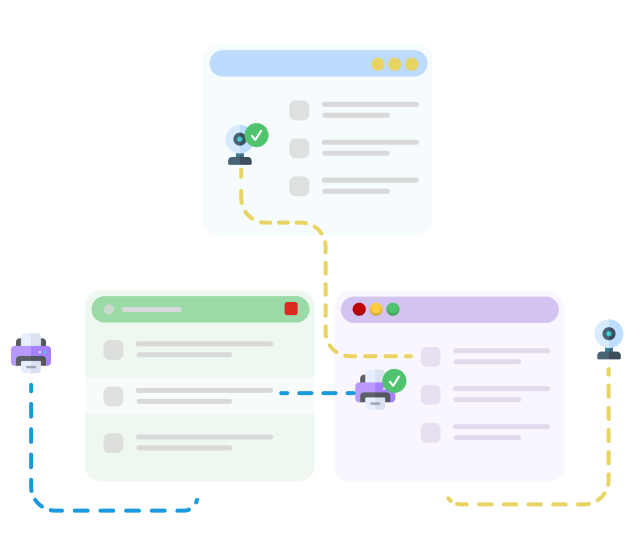
Administrator Mode: Our USB Over Ethernet software allows users confidently use USBoNET without fear of causing any disruptions, as certain features work only with Administrator rights, preventing potential system instability or security breaches.
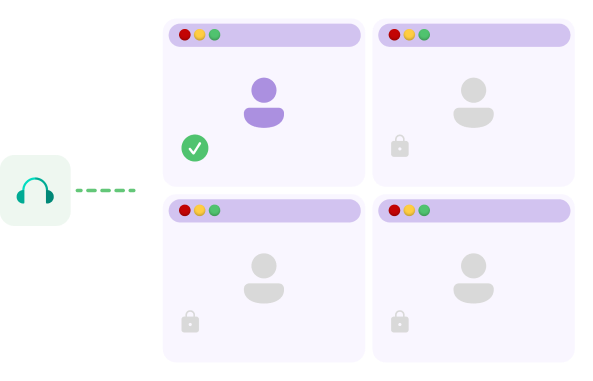
Advanced USB Device Isolation: By default, all connected USB devices are accessible to every user on a computer. It’s a major problem in shared environments, such as PCs with multiple users or terminal servers hosting numerous Remote Desktop sessions. Operating systems lack built-in tools to control access to specific devices for individual users.
Introducing USBoNET as the solution to this challenge. Our USB over IP Software offers a unique device isolation feature to resolve this issue. Users can securely isolate USB devices, ensuring exclusive usage even in scenarios where multiple users share the same computer.

IPv6
IPv6 Support: Our software works the same perfectly with IPv6 as with IPv4.

Compatibility
Universal Compatibility: USBoNET enables seamless sharing of USB devices across both wired and wireless networks, with dedicated software for Windows platforms. Furthermore, dedicated software for Linux, Android, Raspberry Pi and MacOS is currently in development. Stay tuned.
GUI
Simple and User-Friendly Design: Compatibility with both dark and light your system’s themes, and multilingual support.

Update
Automated Update Checks: The software includes a feature that automatically checks for updates, ensuring users benefit from the latest enhancements, security patches, and improvements without the need for manual intervention.
Here’s when USBoNET comes to help

Beginner’s guide — A quick guide for new users of USBoNET
Get started ⇢
How to connect and share a USB device
Continue your studies ⇢

Differences between gateway internet connections
Read more ⇢
Supported devices
USBoNET software over Ethernet supports a wide range of devices to share USB over Ethernet. These devices include, but not limited by:
Equipment:
USB Monitors, USB Wireless Presenter,
3D Printers, Cameras, Card readers, Digital TV Tuners, Webcams, Personal video recorders, Fingerprint readers, ID card scanners, Interactive Whiteboards, Modems, USB ANT Stick, Portable Thermometers, Multifunctionals, Plotters, Cutters, Printers, Scanners, USB Scales, Barcode scanners, Spectrophotometers, Universal Programmers, Smart Card Readers, Digital Mixers.
Communications:
USB DVD Drives, Android Devices,
BlackBerry, Gamepads, Graphic Tablets, Handhelds, Home Monitoring & Control System, iPads & iPhones, iPods, Keyboards, MIDI Controllers, Mouse Devices, USB Dongles, USB Hard Drives, Wireless Weather Stations, USB VOIP (Skype) Phone, Universal remote control.
Data Input/Output:
USB Graphic Adapter, USB Network interfaces, USB Satellite Receivers, USB sound cards/headsets,
Bluetooth adapters, Credit Card Readers, Depth Sensors, Elgato Turbo.264HD Hardware Accelerator, Infrared adapters, J2534 interface cables, JTAG/SWD debugging interface, KNX/EIB USB Interface, Software Defined Receiver, USB Adapters, USB TAPs, USB to COM cables, USB Wi-Fi adapters.
A Step-by-Step Guide
To Access Your USB Device from Anywhere with USBoNET:
1. Share the USB Device:
1.1. Download and install USBoNET on the computer directly connected to the USB device .
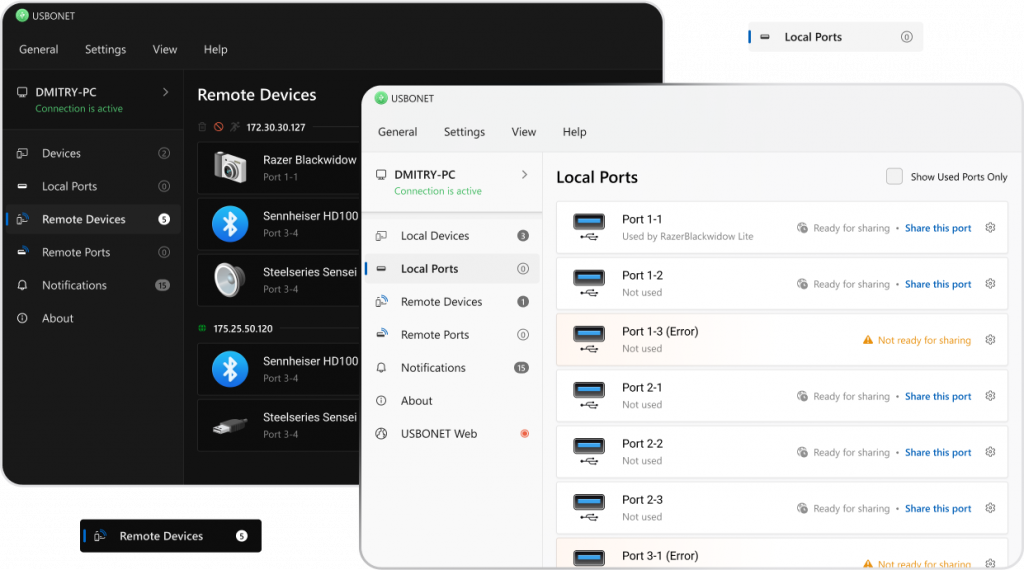
1.2. Open USBoNET and navigate to the “Device” tab.
1.3. Choose your USB device from the list.
1.4. Click “Allow access” to make your device visible to remote clients and available for remote access.
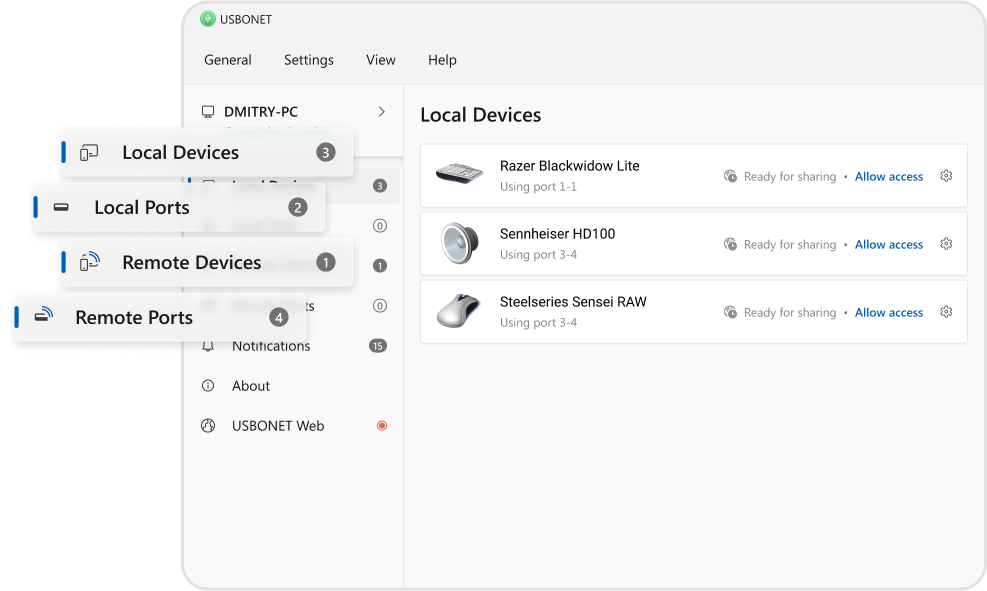
2. Connect to the Shared Device:
2.1. On the remote computer, download and install USBoNET.
2.2. Go to the “Remote Ports” Tab.
2.3. Find your shared USB device in the list.
2.4. Click the “Connect” button to establish a connection. Now you can use the device remotely, just like it’s plugged directly into your computer!
Features
USB 1.1, USB 2.0 and USB 3.0 supported
Compatible with Hyper-V, VMware ,VirtualBox and other virtual machines
Device sharing, unsharing, connection and disconnection on-the-fly
Intel 32-bit/64-bit and ARM64-bit compatible
Supports isochronous USB devices
Supports RDP session isolation
Supports user isolation
Automatically restores broken connections
No vendor USB device driver is required on server side
USB server and USB client in one application
CLI Command line interface
Forced device connection from server side (WEBadmin and Remote control)
Custom device names
ECC Encryption
Data Compression
Shared access
Remote access to shared USB devices via a browser
USB over Ethernet data traffic optimization
Share USB over Wi-Fi, over RDP
Access remote USB devices in virtual environment (VMware Workstation, VMware ESX, Citrix XenDesktop, Microsoft Hyper-V)
Share 3D mouse over LAN
iPhone remote access

#1 at Networking
USBoNET – USB Over Network
Share USB over Ethernet on Windows
*Free trial version key for 1 year

– Requirements
OS Windows: 10/11 (x86/x64/ARM64)OS Windows Server 2016/2019
– Latest version:
v1.2.0..0, Released 28 Feb, 2024
– Category
Networking
– Demo limitations:
365-day trial, You can share only 3 local USB-device Web-Admin and Gate Mode enabled
– Demo limitations:
Starts from $59.00
– Languages:
English, русский, Українська
– Special offers:
USBoNET is a cross-platform solution compatible with Mac, Linux and Android OSes – appear soon.
USBoNet for Mac
Coming soon

USBoNet for Android
Coming soon

USBoNet for Linux
Coming soon